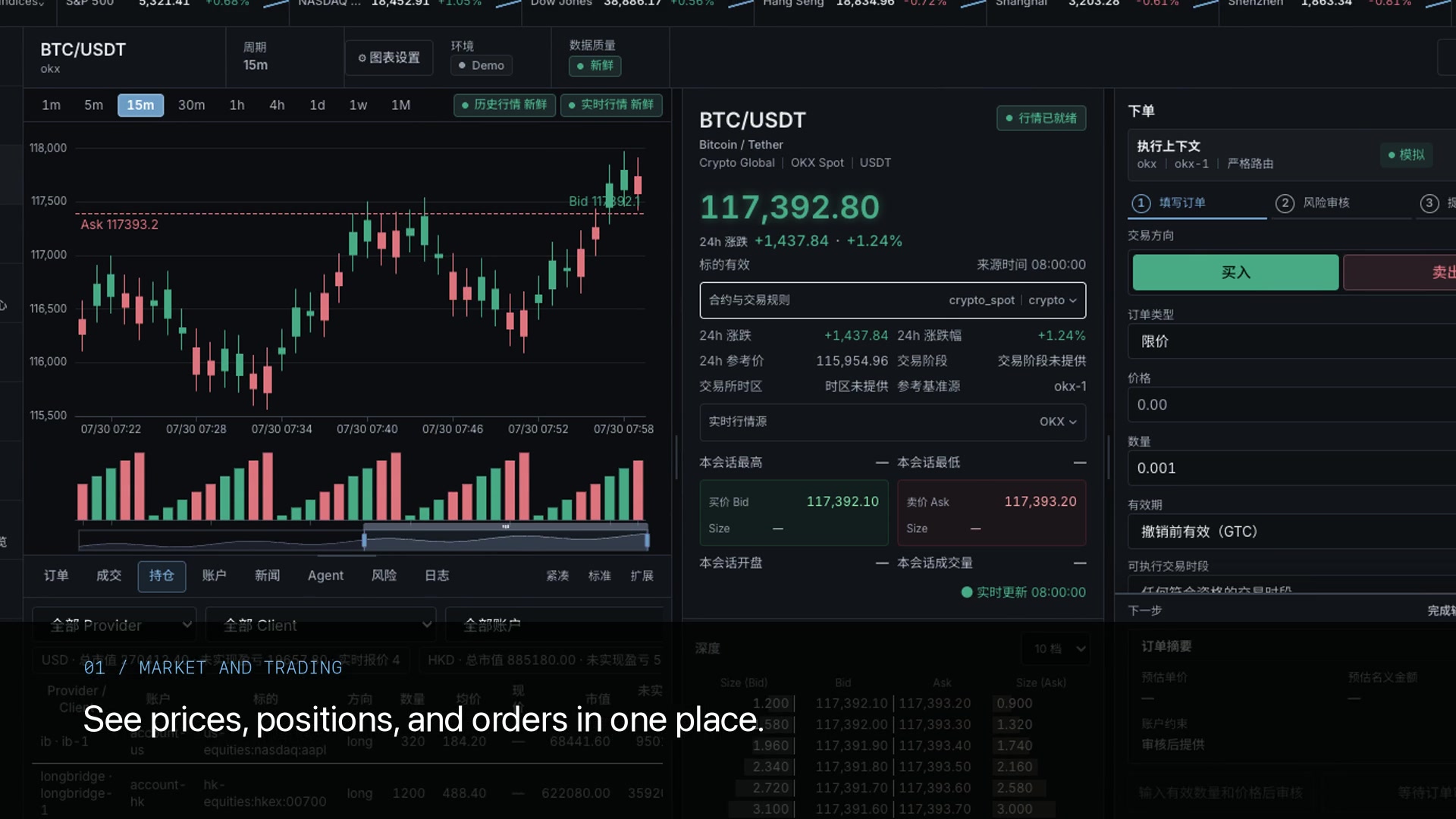
相場の変化を見る
市場と銘柄を確認し、価格、出来高、板情報を見ます。
何が変化しているかを把握
 TrueFixStudio
TRUEFIX STUDIO · 調査と取引のワークスペース
相場データ、AIによる戦略作成、バックテスト、取引前の確認を一つに。銘柄の調査から戦略のレビューとデプロイまで、同じワークスペースで進められます。
市場のシグナルが集まり、あなたのルールが出発点になる。
指標とルールが追跡可能な判断コンテキストになります。
ランタイムがシグナル、対象、現在の状態を確認します。
権限、制限、利用者の確認を意図と実行の間に置きます。
注文、約定、ポジション、Providerの応答を実行記録に残します。
手順を選んで画面を見る
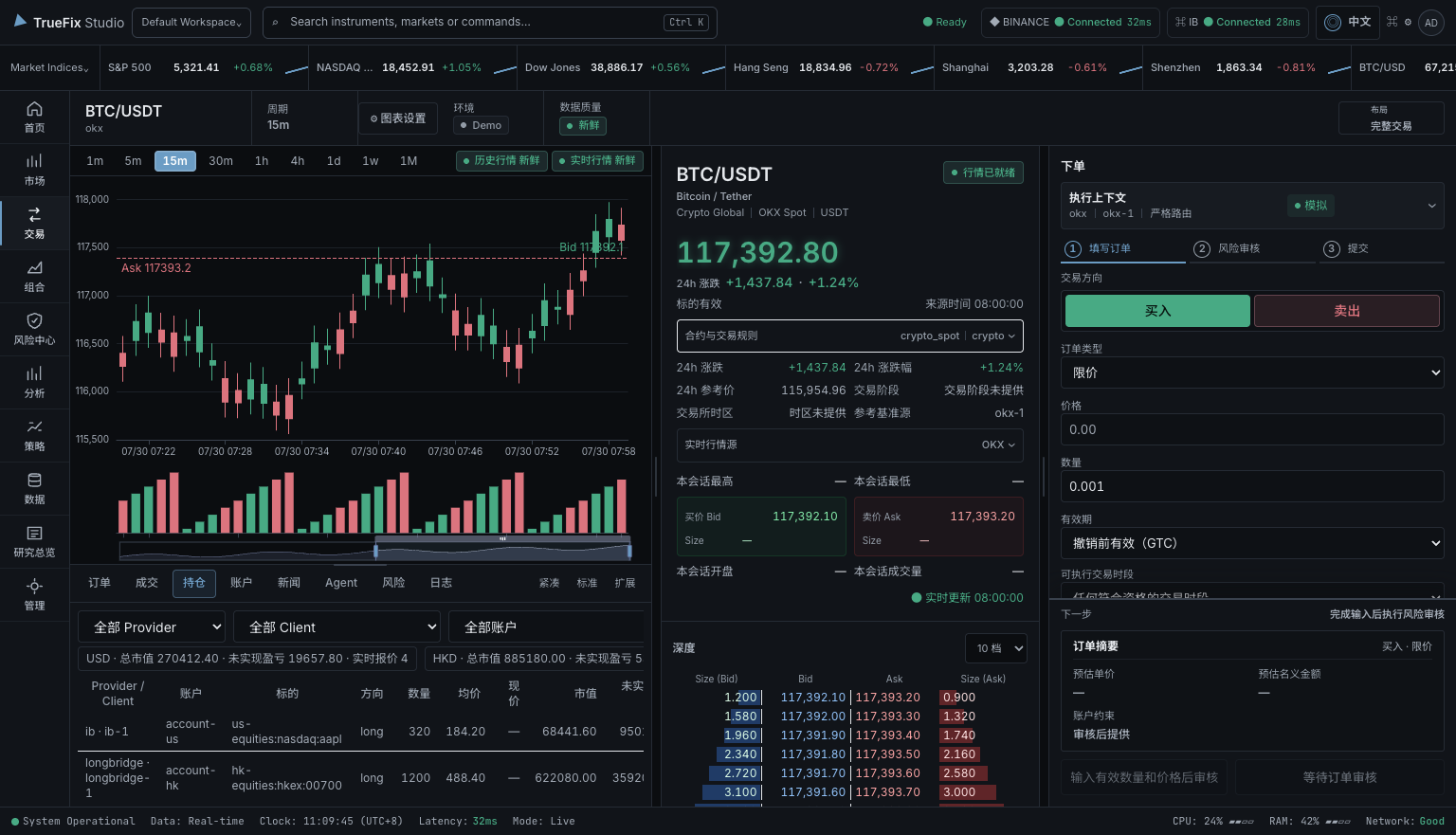
チャート、板情報、口座を並べて、何が変化しているかを確認します。
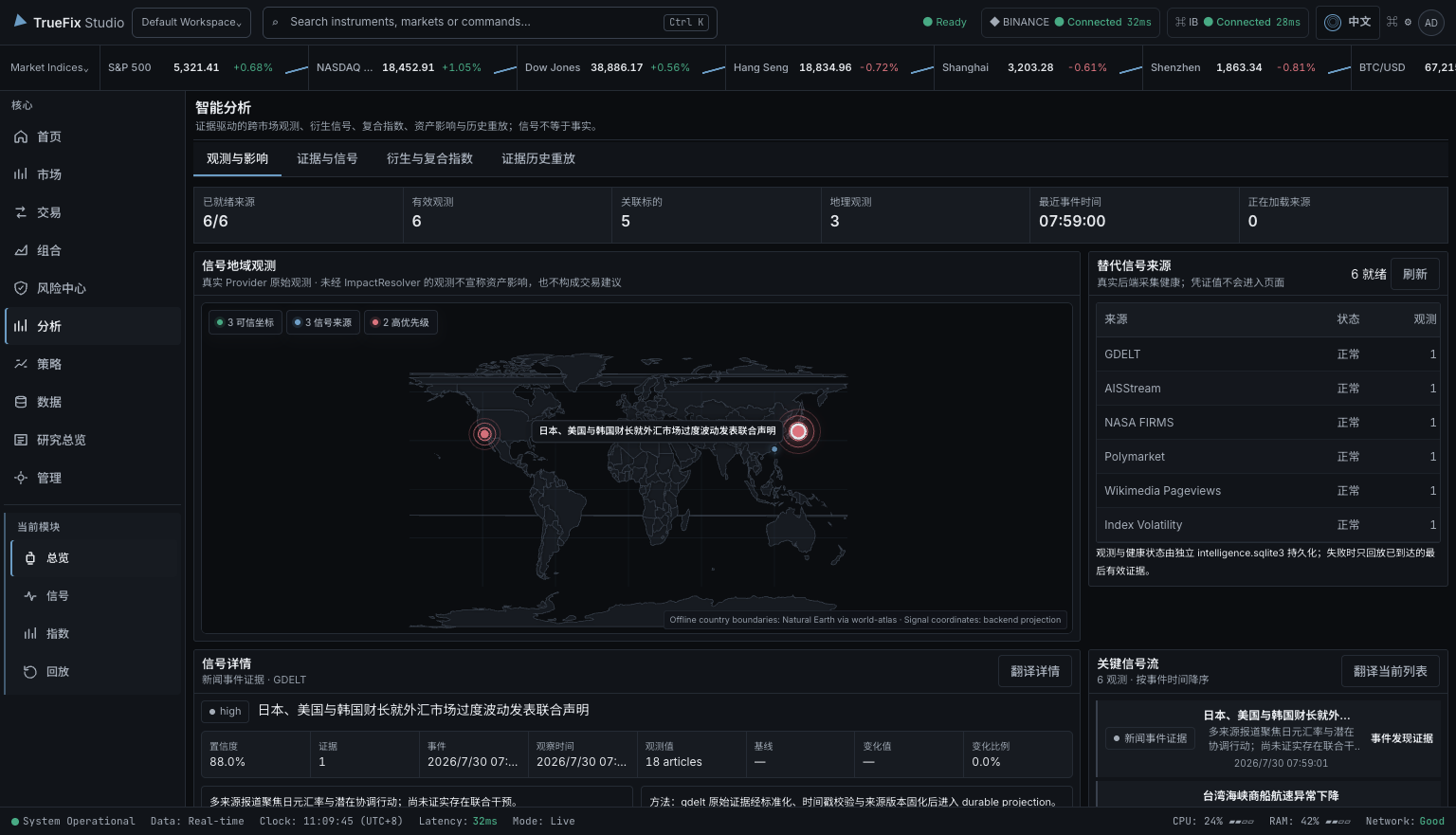
シグナルと原典を確認し、AIに情報や未確認の点の整理を手伝ってもらいます。
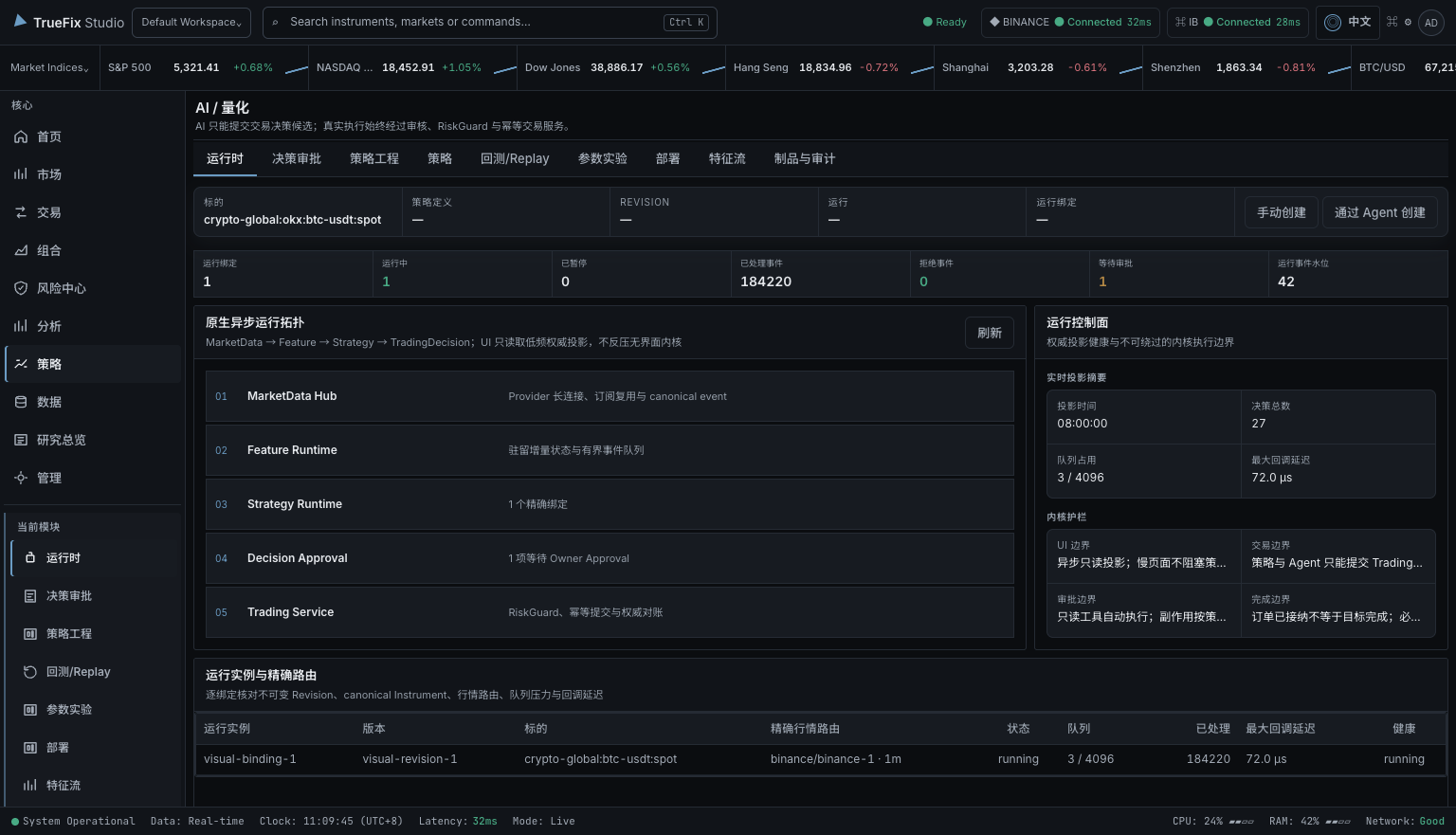
AIと戦略案を作り、検証とバックテストやリプレイを実施。デプロイ案を確認してから、明示的に起動し監視します。
取引画面で注文とリスクを確認してから、送信するか判断します。
製品画面の例 · データはリアルタイムではありません
一つの値動きから
情報を調べ、アイデアを試し、注文を確認。調査だけに使うことも、必要な次の段階へ進むこともできます。
市場と銘柄を確認し、価格、出来高、板情報を見ます。
何が変化しているかを把握
ニュースやシグナルの原典を開き、AIで関連情報を整理します。
事実と未確認の点を区別
取引ルールとリスク上限を伝えて戦略案を作り、過去データやシミュレーションで検証します。
レビュー後にデプロイし、監視
口座、環境、数量、手数料、リスクを確認してから送信を判断します。
送信、修正、または引き続き観察
口座と資金は証券会社や取引所に残ります。接続するサービスは自分で選べます。機能はサービス、権限、環境に依存します。現在はプレリリース版です。
AIによる戦略作成とデプロイ
Desktopの戦略エンジニアリングでAgentに目標を伝えます。戦略とテスト結果を確認し、デプロイ画面で提案をレビューして承認・起動します。
銘柄、ルール、制約を伝え、不明点の確認に答えます。
戦略バージョンを確認し、バックテストやリプレイで挙動とリスクを調べます。
バージョン、データ源、口座、環境、リスク上限を確認します。
Desktopで提案を承認し、承認済みデプロイを明示的に起動します。
実行状態、ログ、判断を確認し、必要に応じて一時停止・停止します。
戦略作成だけで実取引は始まりません。デプロイ作成とLive有効化はDesktopで行います。H5は監視、判断ごとの承認、一時停止・停止に対応します。執行には口座権限とリスク確認が適用されます。
戦略とデプロイのガイドを見る ↗NIGHTLY RELEASE · 0.1.0
TrueFix Studioの現在のNightlyチャンネルから生成された公開プレリリース版です。OSとアーキテクチャに合うパッケージを選択してください。
Apple Silicon · arm64
Apple Silicon Mac向けDMGです。現在のNightlyビルドは未署名です。
DMGをダウンロードWindows · x64
64ビットWindows向け標準セットアップです。管理インストール用MSIも利用できます。
セットアップEXEをダウンロードLinux · x86_64
64ビットLinux向けポータブルAppImageです。apt系システム向けDebianパッケージも利用できます。
AppImageをダウンロード未署名のためmacOSにブロックされた場合、アプリを「アプリケーション」へ移動してから次を実行してください:
xattr -cr "/Applications/TrueFix Studio.app"
TrueFix公式Releaseからダウンロードしたアプリにのみ、このコマンドを使用してください。
利用例
以下は製品の利用例であり、顧客の推薦コメントではありません。利用できる機能は接続するサービスと口座により異なります。
独立系マルチマーケットトレーダー · シンガポール
Mayaは暗号資産と米国株の情報を比較し、シグナルの元情報を開き、行動前に口座とリスクを確認します。
戦略開発者 · 東京
Renは固定した過去データで戦略を試し、結果を確認してから、実口座の前に仮想資金で動かします。
リサーチおよびリスク責任者 · ソウル
Ji-wooは取引権限を与えずにAIアシスタントへ市場情報の整理を依頼します。操作前には人が口座、手数料、リスクを確認します。
対応サービス
接続するサービスと口座は自分で選びます。表示・操作できる内容は、そのサービスの機能と口座権限によって異なります。
 TrueFix
 Binance
 OKX
OKX Bybit
Bybit Interactive Brokers
 Futu
Futu Longbridge
 Alpaca
 Tiger Brokers
 Yahoo Finance
ロゴはTrueFixが接続対象とするサービスを示します。各社によるスポンサーや正式提携を意味しません。機能はサービスと口座によって異なります。
02 / PRODUCT
三つの主要画面で、市場確認、情報源の確認、アイデアのテスト、口座操作の確認を行います。
03 / PRODUCT FILM
市場調査、AIアシスタント、戦略テスト、安全確認、将来構想Market Twinを短く紹介します。
04 / SAFETY
TrueFixは入金を受け付けず、金融口座を開設しません。接続先、口座、権限、テスト・実取引の選択はすべて利用者が行います。
接続先の証券会社、取引所、データサービスが許可した相場・取引権限だけを利用できます。
Service → Account → Permission送信前に口座、銘柄、方向、数量、価格、手数料、リスクを確認します。結果が不明な場合は再送せず、既存注文を照会します。
Check → Risk check → SendAIアシスタントが使えるのは許可したツールだけです。調査権限は取引権限ではなく、AIの提案が自動的に承認済み注文になることもありません。
Analyze → Suggest → You reviewPRODUCT FACTS / FAQ
TrueFix Studioの役割、権限の扱い、現在の範囲を明確に説明します。
TrueFix Studioは、市場調査、戦略テスト、確認済みの取引操作を行うリリース前のデスクトップアプリです。選択した証券会社、取引所、相場データ、AIサービスを接続します。
いいえ。TrueFix Studioはソフトウェアであり、証券会社、取引所、銀行、カストディアン、投資助言業者ではありません。入金、資金の保管、口座開設、利益の約束は行いません。
選択したProvider、ClientInstance、市場、商品、環境、権限、利用資格、データの新しさから機能を判定します。対応付けがない、または曖昧な場合は推測せず拒否します。
いいえ。AIが使えるのは許可したツールと権限だけです。提案は承認済み注文ではなく、許可されたTradingDecisionも確認、リスクチェック、執行制御を通過します。
TrueFixはUnknownの記録を保持し、元のProvider識別子とネイティブ注文IDで照会します。注文を自動的に再送しません。
はい。調査専用または読み取り専用の接続から始め、Simulator、Demo、Testnet、Paperなどの環境を使ってからLiveを検討できます。
05 / HOW IT CONNECTS
TrueFixの主な個人設定は端末に保存されます。自分で設定した証券会社、取引所、相場データ、AIサービスだけに接続します。
接続とデータの説明を見る↗
相場、ニュース、シグナル、口座操作をどのサービスが提供したか表示し、情報源を確認できます。
06 / WAYS TO USE IT
まずはデータ閲覧と調査から。必要なときだけシミュレーション、バックグラウンド戦略、実取引を追加します。
一つのワークスペースで市場データ、ポジション、リスク、注文情報を確認します。
デスクトップ画面を開き続けなくても、同じ口座とリスク制限でルール戦略を実行・テストできます。
許可したデータとツールだけを使って、AIアシスタントに市場情報の整理と説明を依頼します。
07 / ABOUT US
TrueFix Studioは、証券会社、取引所、相場データ、ルール戦略をすでに使っている人向けの独立したプレリリース・デスクトップアプリです。
ツール間の移動を減らし、情報源を確認しやすくし、AIと自動化を利用者の管理下に置くために開発しています。
ローカルファースト
TrueFixのクラウド口座は不要です。外部サービスとの接続は、利用する機能に合わせて自分で設定します。
資金を預からない
TrueFixはソフトウェアであり、証券会社、取引所、銀行、投資助言業者ではありません。入金を受け付けず、資金を預からず、利益を約束しません。
利用者が管理
リサーチのみ、読み取り専用、シミュレーション、認可済みの執行から選べます。AI支援が利用者の確認責任をなくすことはありません。
START WITH THE GUIDE
まず相場サービスを一つ接続。身近な銘柄を確認し、必要に応じてAI、戦略テスト、模擬取引を試せます。